

Source: MachineLearningMastery.com
Training a large language model is slow. If you have multiple GPUs, you can accelerate training by distributing the workload across them to run in parallel. In this article, you will learn about data parallelism techniques. In particular, you will learn about:
- What is data parallelism
- The difference between Data Parallel and Distributed Data Parallel in PyTorch
- How to train a model with data parallelism
Let’s get started!

Training a Model on Multiple GPUs with Data Parallelism
Photo by Ilse Orsel. Some rights reserved.
Overview
This article is divided into two parts; they are:
- Data Parallelism
- Distributed Data Parallelism
Data Parallelism
If you have multiple GPUs, you can combine them to operate as a single GPU with greater memory capacity. This technique is called data parallelism. Essentially, you copy the model to each GPU, but each processes a different subset of the data. Then you aggregate the results for the gradient update.
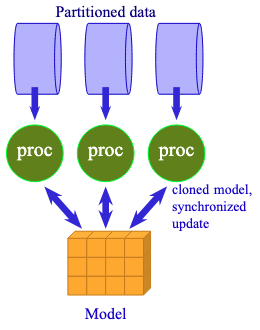
Data parallelism is to share the same model with multiple processors to work on different data.
This is not focused on speed. In fact, switching to data parallelism may slow down training due to extra communication overhead.
Data parallelism is useful when a model still fits on a single GPU but cannot be trained with a large batch size due to memory constraints. In this case, you can use gradient accumulation. This is equivalent to running small batches on multiple GPUs and then aggregating the gradients, as in data parallelism.
Running a PyTorch model with data parallelism is easy. All you need to do is wrap the model with nn.DataParallel. The result is a new model that can distribute and aggregate data across all local GPUs.
Consider the training loop from the previous article, you just need to wrap the model right after you create it:
|
1 2 3 4 5 6 7 8 9 10 11 12 13 14 15 16 17 18 19 20 21 22 23 24 25 26 27 28 29 30 31 32 33 34 35 36 37 |
... model_config = LlamaConfig() model = LlamaForPretraining(model_config) if torch.cuda.device_count() > 1: print(f“Using {torch.cuda.device_count()} GPUs”) model = nn.DataParallel(model) # wrap the model for DataParallel model.train() ... # start training for epoch in range(epochs): pbar = tqdm.tqdm(dataloader, desc=f“Epoch {epoch+1}/{epochs}”) for batch_id, batch in enumerate(pbar): # get batched data input_ids, target_ids = batch # create attention mask: causal mask + padding mask attn_mask = create_causal_mask(input_ids.shape[1], device) + create_padding_mask(input_ids, PAD_TOKEN_ID, device) # extract output from model logits = model(input_ids, attn_mask) # compute loss: cross-entropy between logits and target, ignoring padding tokens loss = loss_fn(logits.view(–1, logits.size(–1)), target_ids.view(–1)) # backward with loss and gradient clipping optimizer.zero_grad() loss.backward() torch.nn.utils.clip_grad_norm_(model.parameters(), 1.0) optimizer.step() scheduler.step() pbar.set_postfix(loss=loss.item()) pbar.update(1) pbar.close() torch.save( model.module.state_dict() if isinstance(model, nn.DataParallel) else model.state_dict(), “model.pth” ) |
You can see that nothing has changed in the training loop. But when you created the model, you wrapped it with nn.DataParallel. The wrapped model is a proxy for the original model but distributes data across multiple GPUs. Every GPU has an identical copy of the model. When you run the model with a batched tensor, the tensor is split across GPUs, and each GPU processes a micro-batch. The results are then aggregated to produce the output tensor.
Similarly, for the backward pass, each GPU computes the gradient for its micro-batch, and the final gradient is aggregated across all GPUs to update the model parameters.
From the user’s perspective, a model trained in data parallelism is no different from a single-GPU model. However, when you save the model, you should save the underlying model, accessible as model.module. When loading the model, load the original model first, then wrap it with nn.DataParallel again.
Note that when you run the training loop as above, the first GPU will consume most of the memory because it holds the master copy of the model parameters and gradients, as well as the optimizer and scheduler state. If you require precise control, you can specify the list of GPUs to use and the device on which to store the master copy of the model parameters.
|
if torch.cuda.device_count() > 1: print(f“Using {torch.cuda.device_count()} GPUs”) model = nn.DataParallel(model, device_ids=[0, 1, 2, 3], output_device=0) |
Distributed Data Parallel
PyTorch DataParallel runs as a multithreaded program. This can be problematic because Python multithreading performance is limited.
Therefore, PyTorch recommends using Distributed Data Parallel (DDP) instead, even when running on a single machine with multiple GPUs. DDP uses a multi-process model in which each GPU runs as a separate process, thereby avoiding the performance bottleneck of multithreading.
Using Distributed Data Parallel is more complex. First, you need to use the torchrun command to launch the program instead of the python command so that the communication infrastructure is set up correctly. Second, your code needs to be modified: A process group needs to be created, your model needs to be wrapped, and the DataLoader needs a sampler to distribute the data across processes. Finally, because there are multiple processes, model checkpointing should be performed only in the master process.
Consider the training script from the previous article, you need to modify several parts:
Before you create the model, you should initialize the process group. Distributed Data Parallel is a PyTorch distributed framework. The total number of workers is called the world size. Each worker has a unique rank, typically starting at 0 and increasing up to the world size minus 1. A worker should map to a distinct GPU device. Because workers may span multiple machines, the GPU device ID on each machine does not correspond to the rank. Therefore, local rank is used to identify the GPU device on the current machine.
To initialize the process group, you need to add a few lines of code before you create the model:
|
1 2 3 4 5 6 7 8 9 10 11 12 13 14 15 16 17 |
... import torch.distributed as dist from torch.nn.parallel import DistributedDataParallel as DDP # Initialize the distributed environment dist.init_process_group(backend=“nccl”) rank = dist.get_rank() local_rank = int(os.environ[“LOCAL_RANK”]) world_size = dist.get_world_size() device = torch.device(f“cuda:{local_rank}”) print(f“World size: {world_size}, Rank: {rank}, Local rank: {local_rank}. Using device: {device}”) # Create pretraining model with default config, then wrap it in DDP model_config = LlamaConfig() model = LlamaForPretraining(model_config).to(rank) model = DDP(model, device_ids=[local_rank]) # , output_device=local_rank) model.train() |
The rank, local_rank, and world_size are integers that you will need later. You can obtain these values only after you call init_process_group(), and they differ for each process launched. You do not need GPUs to run distributed data parallel since PyTorch also supports CPU backends (called gloo). However, you should see reasonable performance for LLM training only on GPUs. For Nvidia GPUs, the NCCL backend (Nvidia Collective Communication Library) should be used.
Note that you must not set the default device explicitly using torch.set_default_device(). This is the job of DDP, and you must not interfere with it.
When you create a model, you should send it to the specific rank you are on, then wrap it with DDP. The wrapped model is the model you should use, so that communication between processes occurs behind the scenes.
In DDP, the same model is replicated across multiple GPUs, and each GPU processes a different subset of the data. You need to make sure your process sees the correct subset:
|
1 2 3 4 5 6 7 8 9 10 11 12 13 14 15 16 17 18 19 20 21 22 23 24 25 26 27 28 29 30 31 32 33 34 35 36 37 38 39 40 41 42 43 |
... from torch.utils.data.distributed import DistributedSampler # Generator function to create padded sequences of fixed length class PretrainingDataset(torch.utils.data.Dataset): def __init__(self, dataset: datasets.Dataset, tokenizer: tokenizers.Tokenizer, seq_length: int): self.dataset = dataset self.tokenizer = tokenizer self.seq_length = seq_length self.bot = tokenizer.token_to_id(“[BOT]”) self.eot = tokenizer.token_to_id(“[EOT]”) self.pad = tokenizer.token_to_id(“[PAD]”) def __len__(self): return len(self.dataset) def __getitem__(self, index): “”“Get a sequence of token ids from the dataset. [BOT] and [EOT] tokens are added. Clipped and padded to the sequence length. ““” seq = self.dataset[index][“text”] tokens: list[int] = [self.bot] + self.tokenizer.encode(seq).ids + [self.eot] # pad to target sequence length toklen = len(tokens) if toklen < self.seq_length+1: pad_length = self.seq_length+1 – toklen tokens += [self.pad] * pad_length # return the sequence x = torch.tensor(tokens[:self.seq_length], dtype=torch.int64) y = torch.tensor(tokens[1:self.seq_length+1], dtype=torch.int64) return x, y batch_size = 64 // world_size dataset = PretrainingDataset(dataset, tokenizer, seq_length) sampler = DistributedSampler(dataset, shuffle=False) dataloader = torch.utils.data.DataLoader( dataset, batch_size=batch_size, sampler=sampler, pin_memory=True, # optional shuffle=False, num_workers=world_size, ) |
In the previous article, the customized Dataset class draws a text sample from the dataset and converts it into two tokenized tensors: one for the input and one for the target. They were created directly on the target device. In DDP, you need to create them in CPU memory and let DDP send them to the appropriate device. Hence, you modified the PretrainingDataset class to remove device management.
The subset of training data is selected by the DistributedSampler. It will determine the rank of the current process to ensure that the data is partitioned correctly. To use the sampler, you should specify it in the DataLoader as shown above. Also note that, in our design, no data shuffling is required. Hence, shuffle=False is specified in both the DistributedSampler and the DataLoader. However, if you need to shuffle the data, you should specify shuffle=True in the DistributedSampler only and leave shuffle=False in the DataLoader. You also need to set sampler.set_epoch(epoch) at the beginning of each epoch to trigger a new shuffle.
The pin_memory=True argument in DataLoader is optional. It uses a pinned memory buffer to store data, which is faster for moving data from the CPU to the GPU.
DDP differs from DataParallel in that you are responsible for creating the micro-batches for training. This means that the batch_size argument in DataLoader refers to the micro-batch size used in the process, not the effective batch size per training step. Since you have world_size number of processes, you should divide the effective batch size by world_size to get the micro-batch size.
During training, most of the code is the same as before, except you want to leave the checkpointing to the process with rank 0 only:
|
1 2 3 4 5 6 7 8 9 10 11 12 13 14 15 16 17 18 19 20 21 22 23 24 25 26 27 28 29 30 31 32 33 34 35 36 37 38 39 40 41 42 |
... for epoch in range(epochs): pbar = tqdm.tqdm(dataloader, desc=f“Epoch {epoch+1}/{epochs}”) sampler.set_epoch(epoch) # required for shuffling only for batch_id, batch in enumerate(pbar): if batch_id % 1000 == 0 and rank == 0: # checkpoint the model and optimizer state, only on rank 0 process torch.save({ “model”: model.module.state_dict() if isinstance(model, DDP) else model.state_dict(), “optimizer”: optimizer.state_dict(), “scheduler”: scheduler.state_dict(), “epoch”: epoch, “batch”: batch_id, }, f“llama_pretraining_checkpoint.pth”) # get batched data, move from CPU to GPU input_ids, target_ids = batch input_ids = input_ids.to(device) target_ids = target_ids.to(device) # create attention mask: causal mask + padding mask attn_mask = create_causal_mask(input_ids) + create_padding_mask(input_ids, PAD_TOKEN_ID) # extract output from model logits = model(input_ids, attn_mask) # compute loss: cross-entropy between logits and target, ignoring padding tokens loss = loss_fn(logits.view(–1, logits.size(–1)), target_ids.view(–1)) # backward with loss and gradient clipping optimizer.zero_grad() loss.backward() torch.nn.utils.clip_grad_norm_(model.parameters(), 1.0) optimizer.step() scheduler.step() pbar.set_postfix(loss=loss.item()) pbar.update(1) pbar.close() # Save the model if rank == 0: torch.save(model.state_dict(), “llama_pretraining_model.pth”) torch.save(model.base_model.state_dict(), “llama_model.pth”) # Clean up the distributed environment dist.destroy_process_group() |
The batch is created in CPU memory and will be moved to the appropriate device once it is passed to the model. However, when computing the loss, the loss function requires that the output tensor logits and the target tensor target_ids be on the same device. Therefore, it is preferable to transfer them to the appropriate device in the first place.
You can see that invoking the model for the forward pass or applying the backward pass is identical to before. However, when you run torch.save() to save the model, you do that only when rank == 0. This avoids multiple processes writing to the same file simultaneously.
Finally, at the end of the program, you should destroy the process group to clean up the distributed environment.
When you finish the script, you can run it with the following command on a single computer with multiple GPUs:
|
torchrun —standalone —nproc_per_node=4 training_ddp.py |
The nproc_per_node argument specifies the number of GPUs to use. You can also use the CUDA_VISIBLE_DEVICES environment variable to specify which GPUs to use. If you need to run it on multiple machines, you should run this command:
|
torchrun —nnodes=2 —nproc_per_node=4 —node_rank=0 —master_addr=10.1.1.1 —master_port=12345 training_ddp.py |
where --master_addr and --master_port are the address and port of the **master node**. The address should be the IP address of the master node where the server should be brought up. On the master node, --node_rank must be 0. On other nodes, --node_rank counts from 1 onwards and should be consistent with the --nnodes (total number of nodes) argument. All nodes should have the same command-line arguments, except for --node_rank, so they run the same program and communicate with the same server.
The complete code for DDP training is as follows:
|
1 2 3 4 5 6 7 8 9 10 11 12 13 14 15 16 17 18 19 20 21 22 23 24 25 26 27 28 29 30 31 32 33 34 35 36 37 38 39 40 41 42 43 44 45 46 47 48 49 50 51 52 53 54 55 56 57 58 59 60 61 62 63 64 65 66 67 68 69 70 71 72 73 74 75 76 77 78 79 80 81 82 83 84 85 86 87 88 89 90 91 92 93 94 95 96 97 98 99 100 101 102 103 104 105 106 107 108 109 110 111 112 113 114 115 116 117 118 119 120 121 122 123 124 125 126 127 128 129 130 131 132 133 134 135 136 137 138 139 140 141 142 143 144 145 146 147 148 149 150 151 152 153 154 155 156 157 158 159 160 161 162 163 164 165 166 167 168 169 170 171 172 173 174 175 176 177 178 179 180 181 182 183 184 185 186 187 188 189 190 191 192 193 194 195 196 197 198 199 200 201 202 203 204 205 206 207 208 209 210 211 212 213 214 215 216 217 218 219 220 221 222 223 224 225 226 227 228 229 230 231 232 233 234 235 236 237 238 239 240 241 242 243 244 245 246 247 248 249 250 251 252 253 254 255 256 257 258 259 260 261 262 263 264 265 266 267 268 269 270 271 272 273 274 275 276 277 278 279 280 281 282 283 284 285 286 287 288 289 290 291 292 293 294 295 296 297 298 299 300 301 302 303 304 305 306 307 308 309 310 311 312 313 314 315 316 317 318 319 320 321 322 323 324 325 326 327 328 329 330 331 332 333 334 335 336 337 338 339 340 341 342 343 344 345 346 347 348 349 350 351 352 353 354 355 356 357 358 359 360 361 362 363 364 365 366 367 368 369 370 371 372 373 374 375 376 |
import dataclasses import os import datasets import tqdm import tokenizers import torch import torch.distributed as dist import torch.nn as nn import torch.nn.functional as F import torch.optim.lr_scheduler as lr_scheduler from torch import Tensor from torch.nn.parallel import DistributedDataParallel as DDP from torch.utils.data.distributed import DistributedSampler # Build the model @dataclasses.dataclass class LlamaConfig: “”“Define Llama model hyperparameters.”“” vocab_size: int = 50000 # Size of the tokenizer vocabulary max_position_embeddings: int = 2048 # Maximum sequence length hidden_size: int = 768 # Dimension of hidden layers intermediate_size: int = 4*768 # Dimension of MLP’s hidden layer num_hidden_layers: int = 12 # Number of transformer layers num_attention_heads: int = 12 # Number of attention heads num_key_value_heads: int = 3 # Number of key-value heads for GQA class RotaryPositionEncoding(nn.Module): “”“Rotary position encoding.”“” def __init__(self, dim: int, max_position_embeddings: int) -> None: “”“Initialize the RotaryPositionEncoding module Args: dim: The hidden dimension of the input tensor to which RoPE is applied max_position_embeddings: The maximum sequence length of the input tensor ““” super().__init__() self.dim = dim self.max_position_embeddings = max_position_embeddings # compute a matrix of ntheta_i N = 10_000.0 inv_freq = 1.0 / (N ** (torch.arange(0, dim, 2) / dim)) inv_freq = torch.cat((inv_freq, inv_freq), dim=–1) position = torch.arange(max_position_embeddings) sinusoid_inp = torch.outer(position, inv_freq) # save cosine and sine matrices as buffers, not parameters self.register_buffer(“cos”, sinusoid_inp.cos()) self.register_buffer(“sin”, sinusoid_inp.sin()) def forward(self, x: Tensor) -> Tensor: “”“Apply RoPE to tensor x Args: x: Input tensor of shape (batch_size, seq_length, num_heads, head_dim) Returns: Output tensor of shape (batch_size, seq_length, num_heads, head_dim) ““” batch_size, seq_len, num_heads, head_dim = x.shape dtype = x.dtype # transform the cosine and sine matrices to 4D tensor and the same dtype as x cos = self.cos.to(dtype)[:seq_len].view(1, seq_len, 1, –1) sin = self.sin.to(dtype)[:seq_len].view(1, seq_len, 1, –1) # apply RoPE to x x1, x2 = x.chunk(2, dim=–1) rotated = torch.cat((–x2, x1), dim=–1) output = (x * cos) + (rotated * sin) return output class LlamaAttention(nn.Module): “”“Grouped-query attention with rotary embeddings.”“” def __init__(self, config: LlamaConfig) -> None: super().__init__() self.hidden_size = config.hidden_size self.num_heads = config.num_attention_heads self.head_dim = self.hidden_size // self.num_heads self.num_kv_heads = config.num_key_value_heads # GQA: H_kv < H_q # hidden_size must be divisible by num_heads assert (self.head_dim * self.num_heads) == self.hidden_size # Linear layers for Q, K, V projections self.q_proj = nn.Linear(self.hidden_size, self.num_heads * self.head_dim, bias=False) self.k_proj = nn.Linear(self.hidden_size, self.num_kv_heads * self.head_dim, bias=False) self.v_proj = nn.Linear(self.hidden_size, self.num_kv_heads * self.head_dim, bias=False) self.o_proj = nn.Linear(self.num_heads * self.head_dim, self.hidden_size, bias=False) def forward(self, hidden_states: Tensor, rope: RotaryPositionEncoding, attn_mask: Tensor) -> Tensor: bs, seq_len, dim = hidden_states.size() # Project inputs to Q, K, V query_states = self.q_proj(hidden_states).view(bs, seq_len, self.num_heads, self.head_dim) key_states = self.k_proj(hidden_states).view(bs, seq_len, self.num_kv_heads, self.head_dim) value_states = self.v_proj(hidden_states).view(bs, seq_len, self.num_kv_heads, self.head_dim) # Apply rotary position embeddings query_states = rope(query_states) key_states = rope(key_states) # Transpose tensors from BSHD to BHSD dimension for scaled_dot_product_attention query_states = query_states.transpose(1, 2) key_states = key_states.transpose(1, 2) value_states = value_states.transpose(1, 2) # Use PyTorch’s optimized attention implementation # setting is_causal=True is incompatible with setting explicit attention mask attn_output = F.scaled_dot_product_attention( query_states, key_states, value_states, attn_mask=attn_mask, dropout_p=0.0, enable_gqa=True, ) # Transpose output tensor from BHSD to BSHD dimension, reshape to 3D, and then project output attn_output = attn_output.transpose(1, 2).reshape(bs, seq_len, self.hidden_size) attn_output = self.o_proj(attn_output) return attn_output class LlamaMLP(nn.Module): “”“Feed-forward network with SwiGLU activation.”“” def __init__(self, config: LlamaConfig) -> None: super().__init__() # Two parallel projections for SwiGLU self.gate_proj = nn.Linear(config.hidden_size, config.intermediate_size, bias=False) self.up_proj = nn.Linear(config.hidden_size, config.intermediate_size, bias=False) self.act_fn = F.silu # SwiGLU activation function # Project back to hidden size self.down_proj = nn.Linear(config.intermediate_size, config.hidden_size, bias=False) def forward(self, x: Tensor) -> Tensor: # SwiGLU activation: multiply gate and up-projected inputs gate = self.act_fn(self.gate_proj(x)) up = self.up_proj(x) return self.down_proj(gate * up) class LlamaDecoderLayer(nn.Module): “”“Single transformer layer for a Llama model.”“” def __init__(self, config: LlamaConfig) -> None: super().__init__() self.input_layernorm = nn.RMSNorm(config.hidden_size, eps=1e–5) self.self_attn = LlamaAttention(config) self.post_attention_layernorm = nn.RMSNorm(config.hidden_size, eps=1e–5) self.mlp = LlamaMLP(config) def forward(self, hidden_states: Tensor, rope: RotaryPositionEncoding, attn_mask: Tensor) -> Tensor: # First residual block: Self-attention residual = hidden_states hidden_states = self.input_layernorm(hidden_states) attn_outputs = self.self_attn(hidden_states, rope=rope, attn_mask=attn_mask) hidden_states = attn_outputs + residual # Second residual block: MLP residual = hidden_states hidden_states = self.post_attention_layernorm(hidden_states) hidden_states = self.mlp(hidden_states) + residual return hidden_states class LlamaModel(nn.Module): “”“The full Llama model without any pretraining heads.”“” def __init__(self, config: LlamaConfig) -> None: super().__init__() self.rotary_emb = RotaryPositionEncoding( config.hidden_size // config.num_attention_heads, config.max_position_embeddings, ) self.embed_tokens = nn.Embedding(config.vocab_size, config.hidden_size) self.layers = nn.ModuleList([LlamaDecoderLayer(config) for _ in range(config.num_hidden_layers)]) self.norm = nn.RMSNorm(config.hidden_size, eps=1e–5) def forward(self, input_ids: Tensor, attn_mask: Tensor) -> Tensor: # Convert input token IDs to embeddings hidden_states = self.embed_tokens(input_ids) # Process through all transformer layers, then the final norm layer for layer in self.layers: hidden_states = layer(hidden_states, rope=self.rotary_emb, attn_mask=attn_mask) hidden_states = self.norm(hidden_states) # Return the final hidden states return hidden_states class LlamaForPretraining(nn.Module): def __init__(self, config: LlamaConfig) -> None: super().__init__() self.base_model = LlamaModel(config) self.lm_head = nn.Linear(config.hidden_size, config.vocab_size, bias=False) def forward(self, input_ids: Tensor, attn_mask: Tensor) -> Tensor: hidden_states = self.base_model(input_ids, attn_mask) return self.lm_head(hidden_states) def create_causal_mask(batch: Tensor, dtype: torch.dtype = torch.float32) -> Tensor: “”“Create a causal mask for self-attention. Args: batch: Batch of sequences, shape (batch_size, seq_len) dtype: Data type of the mask Returns: Causal mask of shape (seq_len, seq_len) ““” batch_size, seq_len = batch.shape mask = torch.full((seq_len, seq_len), float(‘-inf’), device=batch.device, dtype=dtype) .triu(diagonal=1) return mask def create_padding_mask(batch: Tensor, padding_token_id: int, dtype: torch.dtype = torch.float32) -> Tensor: “”“Create a padding mask for a batch of sequences for self-attention. Args: batch: Batch of sequences, shape (batch_size, seq_len) padding_token_id: ID of the padding token dtype: Data type of the mask Returns: Padding mask of shape (batch_size, 1, seq_len, seq_len) ““” padded = torch.zeros_like(batch, device=batch.device, dtype=dtype) .masked_fill(batch == padding_token_id, float(‘-inf’)) mask = padded[:,:,None] + padded[:,None,:] return mask[:, None, :, :] # Generator function to create padded sequences of fixed length class PretrainingDataset(torch.utils.data.Dataset): def __init__(self, dataset: datasets.Dataset, tokenizer: tokenizers.Tokenizer, seq_length: int): self.dataset = dataset self.tokenizer = tokenizer self.seq_length = seq_length self.bot = tokenizer.token_to_id(“[BOT]”) self.eot = tokenizer.token_to_id(“[EOT]”) self.pad = tokenizer.token_to_id(“[PAD]”) def __len__(self): return len(self.dataset) def __getitem__(self, index): “”“Get a sequence of token ids from the dataset. [BOT] and [EOT] tokens are added. Clipped and padded to the sequence length. ““” seq = self.dataset[index][“text”] tokens: list[int] = [self.bot] + self.tokenizer.encode(seq).ids + [self.eot] # pad to target sequence length toklen = len(tokens) if toklen < self.seq_length+1: pad_length = self.seq_length+1 – toklen tokens += [self.pad] * pad_length # return the sequence x = torch.tensor(tokens[:self.seq_length], dtype=torch.int64) y = torch.tensor(tokens[1:self.seq_length+1], dtype=torch.int64) return x, y # Load the tokenizer tokenizer = tokenizers.Tokenizer.from_file(“bpe_50K.json”) # Load the dataset dataset = datasets.load_dataset(“HuggingFaceFW/fineweb”, “sample-10BT”, split=“train”) # Initialize the distributed environment dist.init_process_group(backend=“nccl”) rank = dist.get_rank() local_rank = int(os.environ[“LOCAL_RANK”]) world_size = dist.get_world_size() device = torch.device(f“cuda:{local_rank}”) print(f“World size: {world_size}, Rank: {rank}, Local rank: {local_rank}. Using device: {device}”) #torch.cuda.set_device(local_rank) #torch.set_default_device(device) # Create pretraining model with default config, then wrap it in DDP model_config = LlamaConfig() model = LlamaForPretraining(model_config).to(rank) model = DDP(model, device_ids=[local_rank]) # , output_device=local_rank) model.train() # print the model size print(f“Model parameters size: {sum(p.numel() for p in model.parameters()) / 1024**2:.2f} M”) print(f“Model buffers size: {sum(p.numel() for p in model.buffers()) / 1024**2:.2f} M”) print(f“Model precision(s): {set([x.dtype for x in model.state_dict().values()])}”) # Training parameters epochs = 3 learning_rate = 1e–3 batch_size = 64 seq_length = 512 num_warmup_steps = 1000 PAD_TOKEN_ID = tokenizer.token_to_id(“[PAD]”) # DataLoader, optimizer, scheduler, and loss function dataset = PretrainingDataset(dataset, tokenizer, seq_length) sampler = DistributedSampler(dataset, shuffle=False) dataloader = torch.utils.data.DataLoader( dataset, batch_size=batch_size, sampler=sampler, pin_memory=True, # optional shuffle=False, num_workers=world_size, ) optimizer = torch.optim.AdamW( model.parameters(), lr=learning_rate, betas=(0.9, 0.99), eps=1e–8, weight_decay=0.1 ) num_training_steps = len(dataloader) * epochs print(f“Number of training steps: {num_training_steps} = {len(dataloader)} * {epochs}”) warmup_scheduler = lr_scheduler.LinearLR( optimizer, start_factor=0.1, end_factor=1.0, total_iters=num_warmup_steps ) cosine_scheduler = lr_scheduler.CosineAnnealingLR( optimizer, T_max=num_training_steps – num_warmup_steps, eta_min=0 ) scheduler = lr_scheduler.SequentialLR( optimizer, schedulers=[warmup_scheduler, cosine_scheduler], milestones=[num_warmup_steps] ) loss_fn = nn.CrossEntropyLoss(ignore_index=PAD_TOKEN_ID) # start training for epoch in range(epochs): pbar = tqdm.tqdm(dataloader, desc=f“Epoch {epoch+1}/{epochs}”) sampler.set_epoch(epoch) # required for shuffling only for batch_id, batch in enumerate(pbar): if batch_id % 1000 == 0 and rank == 0: # checkpoint the model and optimizer state, only on rank 0 process torch.save({ “model”: model.module.state_dict() if isinstance(model, DDP) else model.state_dict(), “optimizer”: optimizer.state_dict(), “scheduler”: scheduler.state_dict(), “epoch”: epoch, “batch”: batch_id, }, f“llama_pretraining_checkpoint.pth”) # get batched data, move from CPU to GPU input_ids, target_ids = batch input_ids = input_ids.to(device) target_ids = target_ids.to(device) # create attention mask: causal mask + padding mask attn_mask = create_causal_mask(input_ids) + create_padding_mask(input_ids, PAD_TOKEN_ID) # extract output from model logits = model(input_ids, attn_mask) # compute loss: cross-entropy between logits and target, ignoring padding tokens loss = loss_fn(logits.view(–1, logits.size(–1)), target_ids.view(–1)) # backward with loss and gradient clipping by L2 norm to 1.0 optimizer.zero_grad() loss.backward() torch.nn.utils.clip_grad_norm_(model.parameters(), 1.0) optimizer.step() scheduler.step() pbar.set_postfix(loss=loss.item()) pbar.update(1) pbar.close() # Save the model if rank == 0: torch.save(model.state_dict(), “llama_pretraining_model.pth”) torch.save(model.base_model.state_dict(), “llama_model.pth”) # Clean up the distributed environment dist.destroy_process_group() |
This code has been tested on a single machine with 4 data center-grade GPUs. You will find that with Data Parallel (single process, multi-threaded), the performance is 4 training steps per second. However, DDP can boost this to 18 training steps per second. Memory consumption in Data Parallel is unbalanced, with the first GPU consuming most of the memory as it serves as the master copy of the entire model. With DDP, all GPUs consume the same amount of memory, resulting in lower total memory consumption. Therefore, DDP is the recommended approach for training on multiple GPUs.
Further Readings
Below are some resources that you may find useful.
- Distributed Data Parallel Developer Notes
- nn.parallel.DistributedDataParallel API
- nn.DataParallel API
- Getting Started with Distributed Data Parallel
Summary
In this article, you have learned about Data Parallelism and Distributed Data Parallel. Data Parallelism is a technique for training a model across multiple GPUs. Distributed Data Parallel is a more advanced technique that enables training a model on a single or multiple machines. You will find that using nn.DataParallel is easier. Using DDP requires more code but offers greater power.