

Source: Unite.AI
A project can have a clear brief and still miss its deadline. It can also have every task assigned while nobody can find the reasoning behind it. ClickUp and Notion address both problems, but they organize the work differently. ClickUp is our stronger choice for coordinating delivery across a team. Notion is our pick when documents, shared knowledge, and flexible databases are the center of the work.
Both appear in our best AI collaboration tools guide. This comparison looks more closely at the decision between them: where your team will plan, discuss, document, and finish its work, and how much of that routine AI can help carry forward.
Quick Verdict
- Choose ClickUp for project execution. Its task structure, scheduling views, dashboards, time tracking, and connected communication give managers a clearer operating system for delivery.
- Choose Notion for team knowledge and flexible planning. Pages, wikis, and databases make a natural home for product briefs, research, meeting notes, and the projects built around them.
ClickUp vs. Notion at a Glance
| What matters | ClickUp | Notion |
|---|---|---|
| Coordinate delivery | Task dependencies, Gantt, resource management | Task databases, subtasks, timelines |
| Record working time | Native timers; timesheets on Business | Timers through connections such as Moment |
| Maintain team knowledge | Docs linked to tasks and projects | Wiki pages, owners, verified information |
| Report on progress | Project dashboards and time reports | Database charts and dashboard views |
| What AI can change | Create and edit tasks and Docs | Create and edit pages and databases |
| Main automation limit | Core: 1,000 actions/month; Business: 10,000 | A database rule cannot trigger another rule |
ClickUp: A Stronger Home for Work That Has to Ship
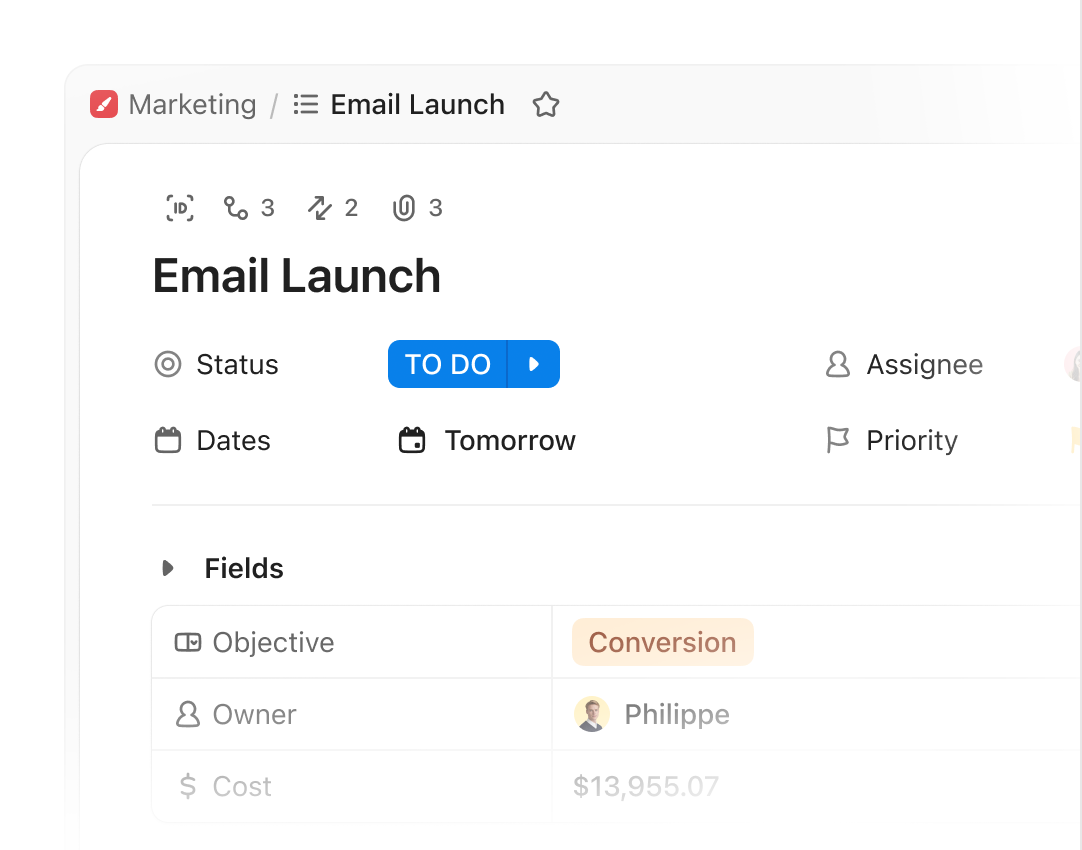
ClickUp makes the most sense when a team needs a dependable answer to three questions: who owns this, when is it due, and what is blocking it? Tasks sit inside a shared hierarchy, with views that let different people work from the same underlying records. A contributor can follow a task list while a project lead works through the schedule and a manager watches a dashboard.
The surrounding tools matter because delivery rarely happens inside a task description alone. ClickUp Docs can hold the brief, comments can capture a decision, and Chat can keep the discussion close to the work. Its native time tracking adds another useful connection for agencies and service teams that need to understand the effort behind an assignment. That combination gives ClickUp a broader role than a simple board of cards.
Official ClickUp walkthrough of project management with ClickUp Brain.
Our recommendation is ClickUp for teams managing recurring launches, client delivery, or several interdependent projects. The tradeoff is the amount of structure available. Spaces, fields, statuses, and dashboards become helpful when the team uses them consistently; a workspace full of competing conventions creates more administration. ClickUp rewards a clear process and someone willing to keep that process coherent.
Notion: A Better Home for the Knowledge Behind the Work

Notion is particularly appealing when a project begins with something people need to understand together: a research collection, a product proposal, a customer problem, or a set of operating principles. A page can contain the explanation, supporting material, and connected database views. The workspace grows around the information instead of requiring every useful detail to become a task.
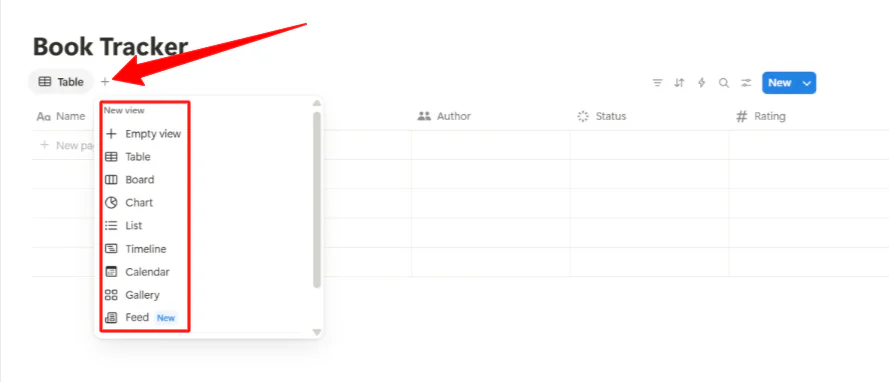
That does not make Notion merely a notebook. Its project tools include tasks, subtasks, dependencies, timelines, and filtered views, while database properties give teams control over how they organize the work. A product team can connect a roadmap to specifications and meeting notes; an editorial team can keep an assignment beside its brief and reference material. The appeal is having the plan and its context together in a form that is easy to shape.
Official Notion introduction to projects and tasks.
We recommend Notion for teams whose most valuable shared asset is their knowledge. Its flexibility suits company wikis, product planning, research, and documentation-heavy collaboration. The same openness creates a responsibility: somebody needs to own the page structure, shared databases, and maintenance of important information. Notion is at its best when colleagues can find a reliable answer, rather than several attractive pages saying slightly different things.
A Practical Example: From Product Brief to Launch
Consider a ten-person team preparing a feature launch. It needs a brief, customer research, a landing page, an announcement email, and a clear record of approvals. Here is how we would organize the same work in each platform.
1. Develop the Brief and Preserve the Reasoning
Our choice: Notion when the brief is still evolving. Keep the customer problem, research, messaging options, and decision log in connected pages. Link the supporting material rather than copying the same explanation into several assignments. This gives a new collaborator a route from the plan to the reasons behind it.
In ClickUp, we would keep the approved brief in a Doc beside the launch tasks. That is the more convenient arrangement when the team already runs delivery there and needs the document to support execution.
2. Convert the Plan Into Deliverables
Our choice: ClickUp for coordinating the handoffs. Give the landing page, email, and release checklist separate tasks, owners, deadlines, and definitions of done. Link dependent work so a delayed approval has a visible consequence for delivery.
In Notion, we would use a shared task database with an owner, status, and due date, linked back to the relevant brief. A board can support the weekly review while a timeline shows the schedule. The advantage is that the task remains a page with room for context.
3. Answer the Next Progress Question
If a manager asks which launch deliverables are late or blocked, ClickUp is our stronger choice for operational oversight. If a teammate asks why the message changed or where the supporting research lives, Notion is our preferred workspace for the answer. A small team can handle both jobs in either product; the recommendation depends on which question dominates its week.
Project Delivery: ClickUp Has the Clearer Advantage
Consider a launch involving design, engineering, marketing, and customer support. The brief matters, but so do dependencies, changing deadlines, outstanding approvals, and the work each team can absorb. ClickUp gives that operating detail a more prominent place. Its Gantt views, task relationships, reporting, and time records make it the stronger choice when coordination is the difficult part.
Notion can organize a launch too. Its timelines and task databases are useful, especially when the project is closely tied to specifications and research. We would choose it for a smaller product team that spends as much time developing the plan as tracking delivery. As the need for operational oversight grows, ClickUp becomes the more compelling primary project system.
Documents and Team Knowledge: Notion Is Our Pick
For onboarding guides, company policies, research libraries, and product documentation, Notion offers a particularly natural structure. Pages can become a team home, a wiki, or a database-backed collection without losing the surrounding explanation. That makes it easier to build a workspace around how people look for information.
ClickUp’s connected Docs are a credible alternative, especially when the document supports a task or project already managed there. Real-time editing, comments, and links to work reduce the distance between discussion and action. Our preference is Notion for a knowledge-centered workspace, and ClickUp Docs when delivery is already the organizing principle.
AI: Choose the Context Your Team Already Maintains
ClickUp Brain² draws on tasks, documents, and conversations to answer questions and help produce work. Its AI tools can create and edit tasks and Docs. Its strongest practical case is proximity to execution: the assistant can work with the same project context the team uses to coordinate delivery. Agents extend that approach into recurring work. For managers who want help gathering updates and moving a shared process forward, ClickUp is our preferred fit.
Notion AI works across pages and databases, with an agent that creates and edits pages and databases, Custom Agents, meeting notes, and search across supported connected sources. We favor it for turning shared knowledge into useful output: developing a brief, finding an earlier decision, organizing research, or preparing an update from workspace material. Its enterprise search is currently labeled beta.
Neither assistant can make an abandoned workspace reliable by itself. The meaningful advantage comes from putting AI beside the information people actually maintain. Choose ClickUp when that information is primarily an active delivery system; choose Notion when it is a living collection of documents and databases.
What Would You Ask the Assistant to Do?
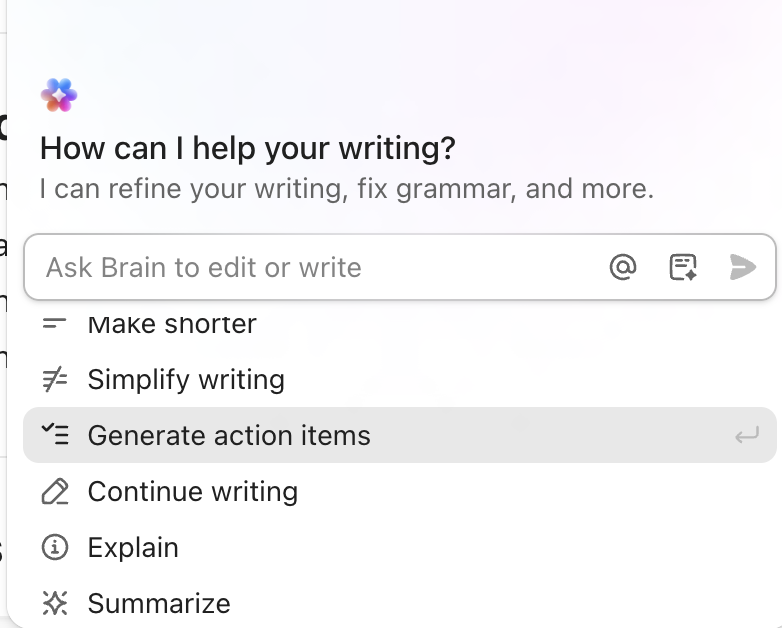
For ClickUp, a useful request is: “Extract the launch actions from these notes. Keep the stated owner and deadline; flag missing information instead of inventing it.” Brain can turn selected Doc text into proposed action items, and the team can create tasks from its response. That is a concrete handoff from discussion to execution.
For Notion, we would start with the brief and connected research: “Draft a launch summary using these pages, link the supporting decisions, and organize the agreed actions in our task database.” Notion Agent can create and edit pages and databases within the user’s access. We prefer this approach when the shared knowledge is the assistant’s most useful context.
The practical limit is the action each assistant can actually take. Notion Agent cannot create new database automations or change page-sharing permissions. Ask it to organize the work; use the workspace’s dedicated controls to set the recurring rule or grant access. For either product, review the generated assignments before treating a suggestion as someone’s commitment.
Automation: Tasks Versus Databases
ClickUp’s automations fit work that moves through task stages. They can connect changes in a project with the next action, while integrations carry selected events into other tools. Its automation allowances are workspace-based: Core includes 1,000 actions a month and Business includes 10,000. Automations pause for the month when the allowance is exceeded.
Notion’s database automations act on changes to records, such as assigning an owner when a status changes or sending a notification. Most custom database automations require a paid plan. An important limitation is that one database automation cannot trigger another, so a long chain of dependent rules needs a different design.
We prefer ClickUp for repeatable delivery processes and Notion for workflows built around a shared information collection. Both offer agents as well, but an agent doing open-ended work and a fixed rule changing a field serve different purposes.
Pricing: Compare the Workspace and Its AI Allowance
| Plan level | ClickUp | Notion |
|---|---|---|
| Free | Free Forever: $0 | Free: $0 |
| Entry paid | Core: $9 per user | Plus: $10 per member |
| Business | $17 per user | $20 per member |
| Enterprise | Custom pricing | Custom pricing |
Paid prices above are monthly equivalents with annual billing. ClickUp’s pricing page displays discounted Core and Business rates of $9 and $17 alongside regular rates of $12 and $25. Those displayed discounts should not be treated as a guaranteed renewal price. Notion lists Plus at $10 and Business at $20 per member per month with annual billing.
For this comparison’s AI workflows, the Business plans are the more useful starting point. ClickUp Business includes Brain², standard model use, and a pooled premium credit allowance. ClickUp lists 1,500 premium credits per user each month, pooled across the workspace. Notion Business generally gives each member 1,500 Standard credits and 500 Select credits monthly; its documentation notes that allowances can vary by purchase arrangement. Notion’s included credits are individual rather than pooled, and additional workspace-funded usage uses Notion credits. The vendors count usage differently, so 1,500 credits does not represent the same amount of work in both products. Notion’s credit guide explains that unused included credits do not roll over and that usage can pause when an allowance runs out.
ClickUp is our value pick when the subscription is replacing a project tracker, time tracker, and scattered delivery reporting. Notion earns its price when it becomes the team’s main knowledge workspace. The cheaper seat is less important than which tool removes a meaningful part of the team’s existing workload.
What a Ten-Person Team Would Pay
For ongoing Business-level AI, ten paid ClickUp Business seats at the advertised $17 annual-billing rate total $2,040 a year. Ten Notion Business seats at $20 total $2,400 a year. These are annual commitments expressed as monthly seat prices, before tax and optional usage charges.
ClickUp’s displayed regular $25 rate would make the same ten-seat subscription $3,000 a year, so its offer should not be treated as a guaranteed renewal rate. The base subscription also does not promise unlimited use of every AI feature. Budget separately for additional usage or optional agents where they are needed.
Permissions and Shared Information
Both products connect AI to workplace content, so the way information is shared matters. ClickUp offers document permissions and higher-tier administrative controls. Notion AI respects the user’s existing access, and Notion Business adds private teamspaces and granular database permissions. Enterprise governance is a separate buying decision in either product, rather than a feature every paid seat automatically includes.
Which One Do We Recommend?
ClickUp is our default recommendation for teams whose main challenge is delivering work together. It puts assignments, deadlines, supporting documents, communication, and reporting in a structure that can support a shared operating rhythm. Agencies, project leads, and teams coordinating several functions have the clearest reason to choose it.
We recommend Notion when the team’s main challenge is preserving and using its knowledge. Its pages and databases are a stronger foundation for research, documentation, product thinking, and flexible planning. Choose it when understanding the work is the center of collaboration, and ClickUp when coordinating its delivery is the harder job.
Frequently Asked Questions
Can Notion manage projects as well as documents?
Yes. It supports task databases, subtasks, dependencies, and timelines. We still prefer ClickUp for teams that need project execution, time records, and operational reporting to drive the workspace.
Does ClickUp include a company wiki?
Yes. ClickUp Docs and wiki features can keep shared information alongside projects. Notion remains our choice when the wiki and its connected knowledge are the main reason for adopting the platform.
Is AI unlimited on either Business plan?
No blanket unlimited promise applies to every AI feature. ClickUp separates standard model access from premium usage, while Notion uses included credit allowances and optional additional workspace credits.
Sources
This comparison draws on official product and help documentation. Its recommendations assess workflow fit and documented capabilities; it does not present a new hands-on performance benchmark.
ClickUp’s documentation covers Docs, time tracking and task features, and security controls. Notion’s documentation explains projects, wikis, and AI privacy and permissions. Further pricing, AI, and automation references are included below.
Notion official references: connections such as Moment, Notion AI, agent that creates and edits pages and databases, database automations, Notion lists Plus at $10 and Business at $20, credit guide.
ClickUp official references: ClickUp Brain², AI tools can create and edit tasks and Docs, automation allowances, ClickUp’s pricing page.
Screenshot credits: the ClickUp task and action-item interfaces are official examples from its task product page and AI documentation guide. The Notion images are reused from Unite.ai’s existing Notion review; they illustrate its page and database structure, rather than a new hands-on test. The launch workflow and prompts above are editorial examples.
Notion’s current Agent guide explains its page/database actions, permissions, and unsupported operations. The official ClickUp plans and Notion plans support the team budget.