
Source: MarkTechPost
Nous Research’s open-source Hermes Agent now ships a Tool Search feature. It directly addresses a growing bottleneck in AI agent systems: too many MCP tools filling up the context window. In this explainer article, we will breaks down what Tool Search does, how it works, and when to use it.
The Problem: MCP Tools Are Eating Your Context Window
When you connect multiple MCP (Model Context Protocol) servers to an AI agent, every tool’s JSON schema gets sent to the model on every turn. This happens even if the model only needs one or two tools for a given task.
Real-world deployments feel this immediately. A Hermes deployment with five MCP servers and 34 tools shows average prompt sizes of 45,000 tokens per turn. Roughly 22,000 of those tokens — around 50% — are tool schema overhead alone.
Anthropic’s own engineering data shows tool definitions can consume 134,000 tokens before optimization. Tool Attention measures the “MCP Tools Tax” at 15,000–60,000 tokens per turn for typical multi-server deployments.
This creates two distinct problems:
- Cost: Cache-miss generations at session start can cost $0.07–$0.10 per turn.
- Accuracy loss: Decision paralysis sets in when the model sees hundreds of irrelevant tool options simultaneously.
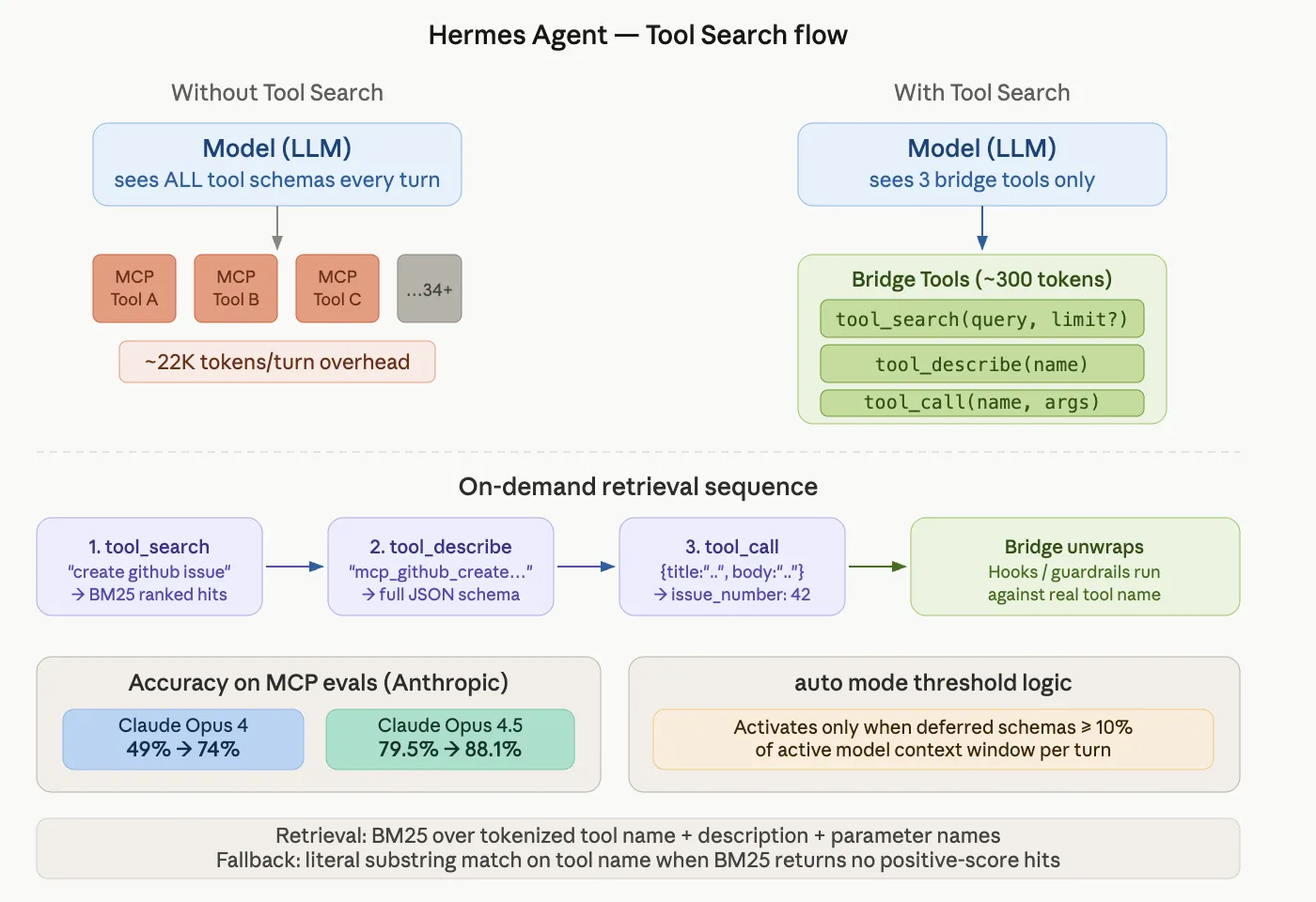
Tool Search is Hermes Agent’s opt-in progressive-disclosure layer for MCP and non-core plugin tools. Instead of loading every tool schema upfront, the model loads only what it needs — on demand, per turn.
When Tool Search activates, MCP and plugin tools are replaced in the model-visible tools array by three bridge tools:
tool_search(query, limit?) — search the deferred-tool catalog tool_describe(name) — load the full schema for one tool tool_call(name, arguments) — invoke a deferred toolA typical interaction looks like this:
Model: tool_search("create a github issue") → { matches: [{ name: "mcp_github_create_issue", ... }] } Model: tool_describe("mcp_github_create_issue") → { parameters: { type: "object", properties: { ... } } } Model: tool_call("mcp_github_create_issue", { title: "...", body: "..." }) → { ok: true, issue_number: 42 }The model searches for what it needs, loads the schema, then calls the tool. All hooks, guardrails, and approval prompts run against the real underlying tool name — not against the bridge.
The Accuracy Numbers
This is not just a token-saving feature. Tool Search also improves model accuracy on MCP evaluations.
According to Anthropic’s internal MCP evals:
- Claude Opus 4: accuracy improved from 49% → 74% with Tool Search enabled
- Claude Opus 4.5: accuracy improved from 79.5% → 88.1% with Tool Search enabled
Large tool catalogs create “decision paralysis” — the model gets confused choosing among many irrelevant options. Removing those options from the context window reduces false positives. Anthropic’s data also shows an 85% reduction in tool-definition token usage while maintaining access to the full tool library.
How the Retrieval Works: BM25 + Fallback
Under the hood, Hermes uses BM25 — a classic information retrieval algorithm — to match the model’s query against a catalog of tool names, descriptions, and parameter names.
If BM25 returns no positive-score hits, the system falls back to a literal substring match on the tool name. This protects against zero-IDF degenerate cases, such as searching for "github" in a catalog where every tool name contains “github.”
The catalog is stateless across turns. It rebuilds from the current tool-defs list on every assembly. This prevents drift bugs where a stored catalog goes out of sync with the live tool registry.
By default, Tool Search runs in auto mode. It activates only when the deferrable tool schemas would consume at least 10% of the active model’s context window.
Below that threshold, the tools-array assembly is a pure pass-through. You pay no overhead.
This decision is re-evaluated on every turn:
- A session with just a few MCP tools and a long-context model may never activate Tool Search.
- A session with many MCP servers attached (15+ tools typically) starts activating it.
- Removing servers mid-session correctly returns to direct tool exposure on the next assembly.
Configuration Reference
Add this to your hermes.yaml to control the behavior:
tools: tool_search: enabled: auto # auto (default), on, or off threshold_pct: 10 # % of context at which auto mode kicks in search_default_limit: 5 max_search_limit: 20| Key | Default | Meaning |
|---|---|---|
enabled |
auto |
auto activates above threshold; on always activates if there’s at least one deferrable tool; off disables entirely |
threshold_pct |
10 |
Percentage of context length at which auto kicks in. Range: 0–100 |
search_default_limit |
5 |
Hits returned when the model calls tool_search without a limit |
max_search_limit |
20 |
Hard upper bound the model can request via limit. Range: 1–50 |
You can also use a simple boolean shorthand:
tools: tool_search: true # equivalent to {enabled: auto}Marktechpost’s Visual Explainer
Nous Research — Hermes Agent 01 / 07
Tool Search: Solving the MCP Context Window Problem
When multiple MCP servers connect to an agent, every tool’s JSON schema loads into the model’s context on every turn — even when only one tool is needed. Hermes Agent’s Tool Search fixes this with progressive schema disclosure.
~22K tokens/turn overhead
in a 5-server, 34-tool setup
85% reduction in tool-definition
token usage (Anthropic data)
134K tokens consumed by tool defs
before optimization (Anthropic)
The Problem 02 / 07
The MCP Tools Tax
Every connected MCP server dumps its full JSON schema into context upfront. With multiple servers, this crowds out the actual conversation and forces the model to choose from hundreds of irrelevant tools, causing decision paralysis.
Research paper arXiv 2604.21816 (“Tool Attention”) measures the MCP Tools Tax at 15,000—60,000 tokens per turn. Cache-miss sessions can cost $0.07—$0.10 per turn in API spend.
GitHub: 35 tools — ~26K tokens Slack: 11 tools — ~21K tokens Jira: ~17K tokens alone
A five-server setup approaches 100K+ token overhead before the conversation starts.
What Is It 03 / 07
Tool Search: A Progressive-Disclosure Layer
Tool Search is Hermes Agent’s opt-in feature that replaces all MCP tool schemas in the model-visible tools array with just three lightweight bridge tools. The model loads each tool’s schema on demand — only when it actually needs it.
tool_search(query, limit?) tool_describe(name) tool_call(name, arguments)
All hooks, guardrails, and approval prompts still run — against the real underlying tool name, not the bridge. The CLI activity feed also unwraps to show the real tool, not the bridge.
How It Works 04 / 07
The Three-Step Retrieval Sequence
1
tool_search BM25 query against tool name, description and params
2
tool_describe Loads full JSON schema for the matched tool into context
3
tool_call Bridge unwraps — real tool executes with full guardrails
Model: tool_search(“create a github issue”) → { matches: [{ name: “mcp_github_create_issue” }] } Model: tool_describe(“mcp_github_create_issue”) → { parameters: { type: “object”, properties: {…} } } Model: tool_call(“mcp_github_create_issue”, { title: “…” }) → { ok: true, issue_number: 42 }
Accuracy Results 05 / 07
Anthropic MCP Evals Show Major Accuracy Gains
Large tool catalogs cause decision paralysis. Removing irrelevant schemas from context reduces false positives. Anthropic’s internal MCP evaluations show significant accuracy improvements with Tool Search enabled.
49% → 74% Claude Opus 4
accuracy on MCP evals
79.5% → 88.1% Claude Opus 4.5
accuracy on MCP evals
Note: ~26 percentage points of accuracy is still retrieval failure on Opus 4. Smaller models perform less reliably on query formulation. Tool Search assumes the model can write a reasonable search query.
Configuration 06 / 07
Setting Up Tool Search in hermes.yaml
tools: tool_search: enabled: auto # auto (default), on, or off threshold_pct: 10 # % of context — auto mode only search_default_limit: 5 max_search_limit: 20 # Shorthand: tools: tool_search: true # equivalent to {enabled: auto}
| Key | Default | Meaning |
|---|---|---|
| enabled | auto | auto activates above threshold; on always activates; off disables |
| threshold_pct | 10 | % of context length at which auto mode kicks in. Range: 0—100 |
| search_default_limit | 5 | Hits returned when model calls tool_search without a limit |
| max_search_limit | 20 | Hard upper bound the model can request via limit. Range: 1—50 |
Key Takeaways 07 / 07
When to Use It — and When Not To
✓ 15+ tools attached ✓ Few tools used per turn ✓ Multiple MCP servers ⚠ Small toolsets — net overhead ⚠ All tools used every turn
- Bridge tools cost ~300 tokens + at least one extra round trip per cold tool
- Deferred schemas get no system-prompt cache prefix benefit
- Catalog is stateless — rebuilds every turn, preventing drift bugs
- Security-scoped: bridge cannot access tools outside the session’s granted toolsets
- Core Hermes tools (terminal, read_file, web_search, send_message…) are never deferred
Source: hermes-agent.nousresearch.com/docs — Anthropic engineering blog — Nous Research 2026
Key Takeaways
- Tool Search defers MCP tool schemas until the model actually needs them — using a
tool_search/tool_describe/tool_callbridge. - Anthropic‘s evals show accuracy gains from 49% → 74% on Claude Opus 4 with large tool catalogs.
- BM25 retrieval over tool name + description + parameter names powers the search, with substring fallback for zero-IDF edge cases.
automode (default) is self-tuning — activates only when tool schemas exceed 10% of the context window.- Core Hermes tools are never deferred; only MCP and non-core plugin tools are eligible.
Check out the Hermes Agent Tool Search Documentation and Anthropic Advanced Tool Use. Also, feel free to follow us on Twitter and don’t forget to join our 150k+ ML SubReddit and Subscribe to our Newsletter. Wait! are you on telegram? now you can join us on telegram as well.
Need to partner with us for promoting your GitHub Repo OR Hugging Face Page OR Product Release OR Webinar etc.? Connect with us